

In today’s visual world, clean, distraction-free photos and videos make a huge difference. Whether you are an influencer polishing your feed, a small business owner creating product content, or just someone who wants a tidy travel photo, two tools are becoming essential: the object remover “cleanup pictures” and the remove watermark from video. Used properly, they save time, improve quality, and help you present more professional-looking content without needing advanced editing skills.
Object Remover And Video Watermark Remover: A Complete Guide
24 de noviembre 2024 · 10:38hs
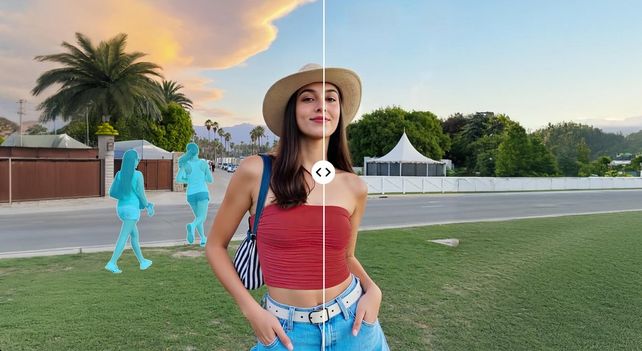
This article explains what an object remover and a video watermark remover are, how they work, how to use them step by step, and what to pay attention to for the best results. It also covers important legal and ethical notes, so you can use these tools safely and responsibly.
What Is An Object Remover?
An object remover is a photo editing feature that helps you delete unwanted elements from an image and automatically fill the empty area with a natural-looking background. Instead of carefully cloning and painting pixels manually, you can simply select the thing you don’t want—such as a random passerby, a trash can, a logo, or a date stamp—and let the tool clean it up.
Most modern object removers are powered by AI and content-aware algorithms. They analyze the surrounding colors, textures, shadows, and patterns, then “inpaint” or reconstruct the missing area so that it blends smoothly with the rest of the image. For example, if you remove a person standing on the beach, the remover looks at the sand, the sea, and the sky nearby and tries to rebuild those elements where the person used to be.
Object removers are widely used in social media photos, e-commerce product images, portraits, travel shots, and even old family photos. They are especially useful when you cannot retake the picture, but you still want a clean, polished result.
What Is A Video Watermark Remover?
A video watermark remover is a tool that helps reduce or hide logos, text, or watermarks from video clips. Watermarks can appear for different reasons: you may have exported your own video with an old logo and want to update it, you may be rebranding your channel, or you may have used a trial version of software that left a watermark on top of your footage.
A video watermark remover typically offers a few methods. One method is cropping, which removes the entire area where the watermark appears, at the cost of slightly changing the video frame size. Another is blurring or masking, where the tool places a blur or a soft patch over the watermark so that it becomes less noticeable. More advanced tools use AI to detect the watermark area and then reconstruct the underlying content frame by frame, similar to how object remover works for photos.
It is very important to note that you should only remove watermarks from videos you own, have created, or have permission to modify. Watermarks often protect copyright and brand ownership. Removing them from someone else’s content without permission can be illegal or violate platform rules.
How Does An Object Remover Work In Practice?
From the user’s perspective, most object removers follow a similar workflow, even though the underlying technology might be complex. You usually start by importing your photo into the app or online tool. Once the image is loaded, you select the object remover feature from the toolbar.
The next step is marking the unwanted object. This can be done with a brush, lasso, or shape tool. You move your finger or mouse over the person, logo, or object you want to erase. Good tools often highlight the selected area with a colored overlay, so you can clearly see what will be removed. For precise edits, you can zoom in and adjust the brush size to cover edges accurately without touching important areas.
After selection, you tap a button such as “Remove,” “Erase,” or “Apply.” The AI then analyzes the photo and replaces the selected region. In a few seconds, the unwanted object disappears, and the area is filled with a reconstructed background. Many tools let you undo, redo, or refine the selection. If the result is not perfect on the first try, you can apply the remover again to clean remaining artifacts or manually fine-tune the area.
How Does A Video Watermark Remover Work?
Video watermark removal is slightly more complex because a video is made up of many frames. However, modern tools try to keep the process simple. First, you upload or import your video into the tool. Once it is loaded, you locate the watermark. It is usually placed in a corner, the center, or near the edges of the frame.
You then draw a box or mask over the watermark area. Some AI tools can detect the watermark automatically and track it across the whole clip. If automatic tracking is available, it will follow the watermark position over time, which is very helpful when the camera moves or the watermark changes size. If tracking is not available, the mask usually stays fixed in one place, which works well for static overlays.
After setting the watermark region, you choose the removal method. Cropping will trim the entire edge where the watermark sits. Blurring will keep the full frame size but make the watermark unreadable. AI logo removal attempts to reconstruct the original content behind the watermark by analyzing nearby pixels and patterns in each frame. Finally, you export the processed video. The more advanced the removal method, the longer the processing can take, but the result also tends to look more natural.
Step-By-Step: Using An Object Remover For A Photo
To understand the experience clearly, imagine you have a beautiful portrait taken in a city street, but there is a distracting trash bin behind you. You want the focus to be on your face, not the background clutter.
You open your chosen photo editing app and import the image. Then you navigate to the tools section and pick “Object remover” or “Remove object.” Once selected, a brush usually appears. You zoom into the area where the trash bin is and carefully paint over it. You do not need extreme precision; as long as the bin is completely covered and you do not touch important parts of your body or clothing, the AI can usually handle it.
Then you tap the remove button. In a moment, the bin vanishes from the scene. The background is now filled with wall, pavement, or other surroundings that match the rest of the photo. If something looks slightly off, you can gently retouch that small area again or enlarge the selection and let the tool recompute it. When you are satisfied, you save or export the final image and share it as if the trash bin never existed.
Step-By-Step: Using A Video Watermark Remover
Now imagine you have filmed a tutorial for your brand and exported it with an old logo in the corner. After a rebranding, you want the same video without that outdated watermark, but you do not have the original project file anymore.
You open a video watermark remover and import the clip. Once it is loaded, you scrub through the timeline to see where the logo appears. If the logo is present throughout the entire video, you position the playhead on any frame and draw a rectangle around the logo.
If the tool supports AI removal, you choose the “Remove logo” or “AI watermark remover” option. The tool analyzes the region and tries to restore the underlying pixels across all frames. If the logo is static and placed over a relatively simple background, the result can be very clean. In other cases, you might prefer a combination of slight blur and smart fill, which makes the logo subtle without creating strange artifacts. After reviewing a preview, you export the new video and use it with your updated branding.
Best Practices For Using An Object Remover
Even though object removers are powerful, they are not magic. The quality of the result depends on the photo and how you use the tool. High-resolution images with clear, simple backgrounds are usually easier to edit. If the background is a flat sky, a wall, or water, the algorithm can reconstruct it more naturally. In contrast, extremely complex scenes with overlapping objects, reflections, or detailed patterns require more care and sometimes multiple passes.
You also get better results when you think about edges and shadows. If you remove a person whose shadow falls on the ground, you may need to remove both the person and the shadow to avoid odd ghost shapes. Similarly, when removing something near the edge of your subject’s hair, face, or clothing, zoom in and use a smaller brush to avoid erasing parts you want to keep. It is often better to work in several smaller selections instead of one huge area.
Finally, remember that object remover is a tool to enhance your photos, not to change reality in a misleading way. For personal photos, you can freely clean up clutter. For professional or journalistic work, be careful not to remove elements in a way that distorts the truth of the scene.
Best Practices For Using A Video Watermark Remover
Video watermark removal demands a balance between quality, time, and ethics. Technically, you will usually get the best result by working with the highest-resolution version of your video. Low-resolution clips leave fewer details for the AI to reconstruct, which can cause blurry or smudged regions where the watermark used to be.
It also helps to keep the watermark area as small as possible. A tight selection around the logo gives the algorithm less work to do and makes the reconstruction more accurate. If the watermark sits in a very complicated part of the frame, you may consider subtle cropping as a combination strategy: crop slightly to move the main subject closer, then use AI removal or blur for any remaining marks.
From an ethical perspective, always ask yourself whether you are allowed to remove that watermark. If the video was created by another brand, platform, or creator, the watermark is usually part of their identity and copyright protection. Removing it and reposting the video as your own is both unfair and risky. On the other hand, cleaning your own logo, trial marks, or layout elements from your original footage to match your current branding is a legitimate and common use.
Choosing The Right Tool For Your Needs
There are many object remover and video watermark remover tools available as mobile apps, desktop software, and online editors. When choosing one, consider how you work most often. If you mainly edit photos for social media on your phone, a mobile app with a simple interface, strong AI object removal, and quick export options will give you the smoothest experience. If you manage a lot of video content for your business, a more powerful desktop or web-based video editor with batch processing, higher export quality, and AI watermark removal might be more suitable.
It is also worth paying attention to privacy and export quality. When you upload personal photos and videos to online services, check whether the tool stores or uses your content for training. For brand or client projects, you may prefer tools that clearly state how they handle user data. As for quality, look at the maximum resolution and bitrate you can export. You do not want to clean up a video only to lose sharpness or end up with heavy compression artifacts.
Legal And Ethical Considerations
Object remover and video watermark remover tools give users incredible creative freedom, but they also come with responsibilities. Removing a stranger from the background of your own photo is generally harmless. However, using these tools to fake evidence, alter news images, or manipulate someone’s appearance in a misleading way can have serious consequences. Always think about how your edits might affect others and whether they could be deceiving or harmful.
For watermarks, the rule is even clearer: if you did not create the original content and do not have explicit permission, do not remove or hide the watermark. Many platforms treat watermark removal as a violation of copyright and community guidelines. Instead, if you admire someone’s video, share it with proper credit or collaborate with them, rather than trying to erase their branding.
Conclusion
Object remover and video watermark remover tools are reshaping how we edit photos and videos. They make it possible for anyone, not just professional editors, to clean up visuals, remove distractions, and present content that looks polished and intentional. By understanding how these tools work, learning the best practices for using them, and respecting legal and ethical boundaries, you can get the most from them without crossing lines.
Whether you are fixing a single photo for your profile, refining a full product catalog, or updating an entire library of brand videos, these features can save time and give your content a more professional edge. Used thoughtfully, they become powerful allies in telling clearer, cleaner, and more compelling visual stories.